How to get in-app purchases for free in Android

In this post i will teach you how to get in-app purchases for free in Android device. There are paid apps, that you need to pay before you download it. But there are apps which is free to download, but in game there are some things that you can buy with real money, or activate to Pro version. And in this post we gonna learn to do that all for free.
1) You need a rooted Android device.
2) Download this app and install it.
3) Now go to Settings of your device. And from Security select Unknown sources.
4) After that you need to change time zone of phone to the Moscow GMT +4:00.
5) After that open app you just downloaded on step 2. And you need to press on the Grant button from pop out SuperSU window. And your device need to be connected to the internet!
6) And you can see the list of your apps, where in-app purchase is available.
7) Choose one app from list and wait after its finished loading.
8) And after app opened, you need to go to page of upgrading, or if its a game the press on the plus button to buy coins or something like that.

9) After that press on the purchase button and in pop out little window press on BUY button.

10) And You can see Payment Successful message.
11) But after you finished in-app purchasing i recommend you to delete that app, if you want to do in-app purchasing then install it again.
12) Now you can't use Play Store, its showing no connection error message.
13) After you have deleted that app, you need to install one app from this post. Do all as in that post and open that hosts file.
14) And remove 2nd line from file. Only keep first line 127.0.0.1 localhost and press on the save button and in pop out window press on the OK button and after that on Yes button.

And that's all. You can ope Play Store!
Hackers Dictionary

If you are a newbie in hacking then you need to learn some things. There are some terms that every hacker should know about them. Some words and abbreviations that you should know.
Some words you need to know aboutAlgorithm - A series of steps specifying which actions to take in which order.
ANSI Bomb - ANSI.SYS key-remapping commands consist of cryptic-looking text that specifies, using ansi numeric codes to redefine keys.
Back Door - Something a hacker leaves behind on a system in order to be able to get back in at a later time.
Binary - A numbering system in which there are only two possible values for each digit: 0 and 1.
Black Hat - A hacker who performs illegal actions to do with hacking online. (Bad guy, per se)
Blue Hat - A blue hat hacker is someone outside computer security consulting firms who is used to bug test a system prior to its launch, looking for exploits so they can be closed. Microsoft also uses the term BlueHat to represent a series of security briefing events.
Bot - A piece of malware that connects computer to an attacker commonly using the HTTP or IRC protocal to await malicous instructions.
Botnet - Computers infected by worms or Trojans and taken over by hackers and brought into networks to send spam, more viruses, or launch denial of service attacks.
Buffer Overflow - A classic exploit that sends more data than a programmer expects to receive. Buffer overflows are one of the most common programming errors, and the ones most likely to slip through quality assurance testing.
Cracker - A specific type of hacker who decrypts passwords or breaks software copy protection schemes.
DDoS - Distributed denial of service. Flooding someones connection with packets. Servers or web-hosted shells can send packets to a connection on a website usually from a booter.
Deface - A website deface is an attack on a site that changes the appearance of the site or a certain webpage on the site.
Dictionary Attack - A dictionary attack is an attack in which a cyber criminal can attempt to gain your account password. The attack uses a dictionary file, a simple list of possible passwords, and a program which fills them in. The program just fills in every single possible password on the list, untill it has found the correct one. Dictionary files usually contain the most common used passwords.
DOX - Personal information about someone on the Internet usualy contains real name, address, phone number, SSN, credit card number, etc.
E-Whore - A person who manipulates other people to believe that he/she is a beautiful girl doing cam shows or selling sexual pictures to make money.
Encryption - In cryptography, encryption applies mathematical operations to data in order to render it incomprehensible. The only way to read the data is apply the reverse mathematical operations. In technical speak, encryption is applies mathematical algorithms with a key that converts plaintext to ciphertext. Only someone in possession of the key can decrypt the message.
Exploit - A way of breaking into a system. An exploit takes advantage of a weakness in a system in order to hack it.
FUD - Fully undetectable, can be used in many terms. Generally in combination with crypters, or when trying to infect someone.
Grey Hat - A grey hat hacker is a combination of a Black Hat and a White Hat Hacker. A Grey Hat Hacker may surf the internet and hack into a computer system for the sole purpose of notifying the administrator that their system has been hacked, for example. Then they may offer to repair their system for a small fee.Hacker (definition is widely disputed among people...) = A hacker is someone who is able to manipulate the inner workings of computers, information, and technology to work in his/her favor.
Hacktivist - A hacktivist is a hacker who utilizes technology to announce a social, ideological, religious, or political message. In general, most hacktivism involves website defacement or denial-of-service attacks.
IP Address - On the Internet, your IP address is the unique number that others use to send you traffic.
IP Grabber - A link that grabs someone's IP when they visit it. Keylogger - A software program that records all keystrokes on a computer's keyboard, used as a surveillance tool or covertly as spyware.Leach = A cultural term in the warez community referring to people who download lots of stuff but never give back to the community.
LOIC/HOIC - Tool(s) used by many anonymous members to conduct DDoS attacks. It is not recommended to use these under any circumstances.
Malware - Software designed to do all kinds of evil stuff like stealing identity information, running DDoS attacks, or soliciting money from the slave. Neophyte = A neophyte, "n00b", or "newbie" is someone who is new to hacking or phreaking and has almost no knowledge or experience of the workings of technology, and hacking.
smith - Somebody new to a forum/game.
OldFag - Somebody who's been around a forum/game for a long time.
Packet - Data that is sent across the Internet is broken up into packets, sent individually across the network, and reassembled back into the original data at the other end.
Phreak - Phone Freaks. Hackers who hack cell phones for free calling. Free Long distance calling. Etc.
Phreaking - The art and science of cracking the phone network. Proxy - A proxy is something that acts as a server, but when given requests from clients, acts itself as a client to the real servers. Rainbow Table - A rainbow table is a table of possible passwords and their hashes. It is way faster to crack a password using rainbow tables then using a dictionary attack (Bruteforce).
Remote Administration Tool - A tool which is used to remotely control (an)other machine(s). These can be used for monitoring user actions, but often misused by cyber criminals as malware, to get their hands on valuable information, such as log in credentials. Resolver - Software created to get an IP address through IM (instant messenger, like Skype/MSN) programs.
Reverse Engineering - A technique whereby the hacker attempts to discover secrets about a program. Often used by crackers, and in direct modifications to a process/application.
Root - Highest permission level on a computer, able to modify anything on the system without restriction.
Rootkit (ring3 ring0) - A powerful exploit used by malware to conceal all traces that it exists. Ring3 - Can be removed easily without booting in safemode. Ring0 - Very hard to remove and very rare in the wild, these can require you to format, it's very hard to remove certain ring0 rootkits without safemode.
Script Kiddie - A script kid, or skid is a term used to describe those who use scripts created by others to hack computer systems and websites. Used as an insult, meaning that they know nothing about hacking.
Shell - The common meaning here is a hacked web server with a DoS script uploaded to conduct DDoS attacks via a booter. OR A shell is an script-executing unit - Something you'd stick somewhere in order to execute commands of your choice.
Social Engineer - Social engineering is a form of hacking that targets people's minds rather than their computers. A typical example is sending out snail mail marketing materials with the words "You may already have won" emblazoned across the outside of the letter. As you can see, social engineering is not unique to hackers; it's main practitioners are the marketing departments of corporations.
Spoof - The word spoof generally means the act of forging your identity. More specifically, it refers to forging the sender's IP address (IP spoofing). (Spoofing an extension for a RAT to change it from .exe to .jpg, etc.)
SQL Injection - An SQL injection is a method often used to hack SQL databases via a website, and gain admin control (sometimes) of the site. You can attack programs with SQLi too.
Trojan - A Trojan is a type of malware that masquerades as a legitimate file or helpful program with the ultimate purpose of granting a hacker unauthorized access to a computer.
VPS - The term is used for emphasizing that the virtual machine, although running in software on the same physical computer as other customers' virtual machines, is in many respects functionallyequivalent to a separate physical computer, is dedicated to the individual customer's needs, has the privacy of a separate physical computer, and can be configured to run server software. Warez - Software piracy
White Hat - A "white hat" refers to an ethical hacker, or a computer security expert, who specializes in penetration testing and in other testing methods to ensure the security of a businesses information systems. (Good guy, per se)
Worm - Software designed to spread malware with little to no human interaction. Zero Day Exploit = An attack that exploits a previously unknown vulnerability in a computer application, meaning that the attack occurs on "day zero" of awareness of the vulnerability. This means that the developers have had zero days to address and patch the vulnerability.
AbbreviationsDDoS - Distributed Denial of Service
DrDoS - Distributed Reflected Denial of Service Attack, uses a list of reflection servers or other methods such as DNS to spoof an attack to look like it's coming from multiple ips. Amplification of power in the attack COULD occur.
FTP - File Transfer Protocol. Used for transferring files over an FTP server.
FUD - Fully Undetectable
Hex - In computer science, hexadecimal refers to base-16 numbers. These are numbers that use digits in the range: 0123456789ABCDEF. In the C programming language (as well as Java, JavaScript, C++, and other places), hexadecimal numbers are prefixed by a 0x. In this manner, one can tell that the number 0x80 is equivalent to 128 decimal, not 80 decimal.
HTTP - Hyper Text Transfer Protocol. The foundation of data communication for the World Wide Web.
IRC - Internet Relay Chat. Transmiting text messages in real time between online users.
JDB - Java drive-by, a very commonly used web-based exploit which allows an attacker to download and execute malicious code locally on a slave's machine through a widely known java vulnerability.
Malware - Malicious Software
Nix - Unix based operating system, usually refered to here when refering to DoS'ing.
POP3 - This is the most popular protocol for picking up e-mail from a server.
R.A.T - Remote Administration Tool
SDB - Silent drive-by, using a zero day web-based exploit to hiddenly and un-detectably download and execute malicious code on a slave's system. (similar to a JDB however no notification or warning is given to the user)
SE - Social Engineering
Skid - Script Kid/Script Kiddie
SMTP - A TCP/IP protocol used in sending and receiving e-mail. SQL - Structured Query Language. It's a programming language, that used to communicate with databases and DBMS. Can go along with a word after it, such as "SQL Injection."
SSH - Secure Shell, used to connect to Virtual Private Servers.
TCP - Transmission Control Protocol, creates connections and exchanges packets of data.
UDP - User Datagram Protocol, An alternative data transport to TCP used for DNS, Voice over IP, and file sharing.
VPN - Virtual Private Network
VPS - Virtual Private Server
XSS (CSS) - Cross Site Scripting
You should learn this all. Else you will stay a newbie.
Change Processor Name Permanently

There are a way to change your computer CPU name from Properties of it. So you can prank with friends with this trick. Change the name to whatever you want and make a dream computer for your friends. No need to download any software, we can do that all without any third party software.
1) Open notepad and type in text given below.
Windows Registry Editor Version 5.00 [HKEY_LOCAL_MACHINE\HARDWARE\DESCRIPTION\System\CentralProcessor\0] "ProcessorNameString"="Intel(R) Core(TM) i7-2600K CPU @ 6.60GHz"You can change Intel(R) Core(TM) i7-2600K CPU @ 6.60GHz to whatever you want.
2) Save file as processor.reg.
3) Now open it, and after that in pop out warn windows press on the Yes button and after that on OK button to close it.
4) Now go to properties of your computer and you can see the results!
Speed Up Internet Connection using DNS

In previous post i posted the best solutions to speed up your internet connection. And visitors find it useful and post helped them a lot. So in this post i will show you another way to speed up internet connection using DNS.
1. Right click on small network icon at bottom of right side and select Open network and sharing center.
2. Select network connection and press on the Properties button in new opened small window.

Google DNS
Preferred DNS server: 8.8.8.8
Alternate DNS server: 8.8.4.4
Open DNS
Preferred DNS server: 208.67.222.222
Alternate DNS server: 208.67.220.220
4. After that click on OK button and its better to restart computer.
The Bluetooth History and Name
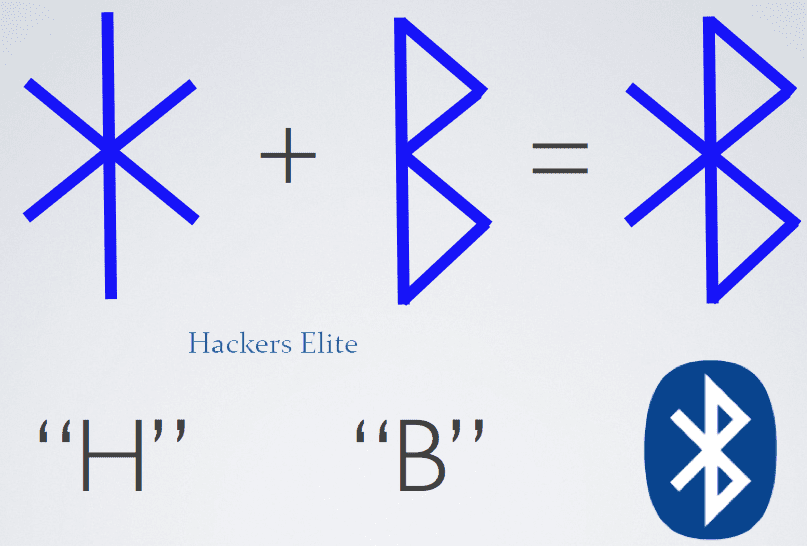
Nowadays anybody know about Bluetooth. But i think after some years it will be out of date, because NFC comes to change it. But still Bluetooth is really important part of our device. So ever you interested about Bluetooth, why its called Bluetooth? The story of Bluetooth. If no then you should read this post, because its and informative and interesting.
Intel mobile computing engineer Jim Kardach was approached by his boss him asking him to develop technology which would help integrate wireless into the notebook. Jim developed a technology for exchanging data over short distances using short-wavelength radio transmissions.
Intel later approached a small group of companies including Ericsson and Nokia, IBM, Motorola, Nokia and Toshiba to form a consortium to discuss the short range wireless technologies and the need to develop a single short-range standard for the same. The idea was to discourage having three or more competing standards for the same technology. During this process of negotiations, it was noticed that each company referred to the technology by different names and this created much confusion. It was then that Jim came up with a code name Bluetooth. Jim Kardach being a huge history fan heard from Sven of Ericson talk about a 10th century king of Denmark. Back at home he received a novel he had ordered named ‘The Vikings’ by Gwyn in which he again read about the Harald Balaatand whom Sven had mentioned. King Harald Blaatand “Bluetooth” 11 united parts of Norway and the dissonant Danish tribes into a single kingdom and ruled Denmark and Sweden seamlessly. Jim proposed the codename to the Special Interest Group (SIG) that was working on a single standard. Harold “Bluetooth’s” success in uniting Scandinavia seemed like the perfect name to describe a technology which would make PC’s and phones communicate seamlessly. This name was initially proposed as a codename only until the group came up with a singular name for the technology. However, the group evidently adopted the name in the end.
That's all you need to know about Bluetooth. I hope you find this interesting. Then make sure you share this post with your friends.
Soccer World Cup related Websites Hacked

Anonymous promised cyber-attack on World Cup Sponsors. They kicked offline earlier this week include World Cup sponsor Hyundai and government state Mato Grosso.
"We had a busy last few days and there is more still to come," a hacker who calls himself Che Commodore and who claims to be a member of the Anonymous hacker collective told Reuters on Wednesday.
"Companies and institutions that work with a government that denies the basic rights of its people in order to promote a private, exclusive and corrupt sports event will be targeted"
"Cyberattacks have become a popular way of gaining notoriety and publicity, though it’s not clear what motivations were behind this attack but could well be the issues that have seen Brazilians protesting almost daily," Edward Parsons, senior manager in the cyber security at KPMG, said in an emailed statement to Mashable.
They are using DDos ( Distributed Denial of Service ) to destroy websites.
Hackers broke into the foreign ministry's email service, accessing dozens of classified documents including a list of foreign dignitaries planning to attend World Cup matches.
Group of Hackers Anonymous plan Cyber-Attack on World Cup Sponsors

Group of Hackers Anonymous plan cyber-attack on FIFA world cup 2014 sponsors. As they say meaning of this cyber attack is to protest the lavish spending on the soccer games in a country struggling to provide basic services.
“We have a plan of attack,” Commodore told the agency “We have already conducted late-night tests to see which of the sites are more vulnerable… This time we are targeting the sponsors of the World Cup.”
"This time we are targeting the sponsors of the World Cup," he said in a Skype conversation from an undisclosed location in Brazil. Asked to name the potential targets he mentioned Adidas, Emirates airline, the Coca-Cola Co and Budweiser.
Commodore said the hacker AnonManifest used a Trojan virus to get into the Foreign Ministry’s databases and steal the email accounts of several diplomats.
Samsung introduces the Galaxy Tab S

Samsung has officially introduced the Galaxy Tab S tablets. New Galaxy comes with Samsung's Super AMOLED screen and WQXGA 2560х1600 bandwidth thinnest and lightest. Galaxy Tab S series will be available in two versions, the main difference between a diagonal screen size of 10.5 inches and 8.4 8.4 the pixel density of 359-inch model, and 10.5 in the 288.
Back side of tablet is very similar to the Galaxy S5 smartphone back side. 3 GB operative memory, internal memory can be 16 GB or 32 GB. It is also possible to increase the memory with microSD cards. 8 Megapixel back camera and 2.1 megapixel front camera
Battery is too different in this new two tabs. Galaxy Tab S 8.4 tablet have a 4900 mA / h battery. Galaxy Tab S 10.5 have a 7900 mA / h battery.
Tablet running Android 4.4.2 operating system.
For tablet there are and Bluetooth Keyboard, Book Cover, Simple Cover.
Samsung Galaxy Tab S 8.4 and Tab S 10.5 will come in this July, and will cost $400 and $500.
Firefox 30 Available with quickshare on Android in context menu, GStreamer 1.0 support

Mozilla launched Firefox 30 for Windows, Linux, Mac and Android. Now its include a button for direct access to sidebar. Now its support GStreamer 1.0 instead of 0.10 version. New quickshare buttons added in the context menu on Android version of Firefox.
So there's the list of new features and bug fixes:
DesktopNew - Sidebars button in browser chrome enables faster access to social, bookmark, & history sidebars
New - Mac OS X command-E sets find term to selected text
Changed - Disallow calling WebIDL constructors as functions on the web
Changed - With the exception of those bundled inside an extension or ones that are whitelisted, plugins will no longer be activated by default
Developer - Support for GStreamer 1.0
Developer - Fixes to box-shadow and other visual overflow
Developer - Mute and volume available per window when using WebAudio
Developer - background-blend-mode enabled by default
Developer - Use of line-height allowed for <input type="reset|button|submit">
Developer - ES6 array and generator comprehensions implemented
Developer - Error stack now contains column number
Developer - Support for alpha option in canvas context options
Fixed - Insecure NTLM (pre-NTLMv2) authentication disabled
Fixed - Ignore autocomplete="off" when offering to save passwords via the password manager
Fixed - TypedArrays don't support new named properties
Fixed - Various security fixes
Unresolved - Errors loading scripts inside eval scripts with Developer Tools open
Unresolved - Mac OS X: cmd-L no longer opens a new window when no window is available
Unresolved - Without affecting security, after restoring your session, Extended Validation Certificates might not display
Unresolved - Slow shut downs lead to 'Firefox is already running' warning
AndroidNew - Add web content to home page panels using Home Feeds Add-On
New - Add Quickshare buttons to Context menu
New - Locales added: Belarusian [be], Argentine Spanish [es-AR], Mexican Spanish [es-MX], Indonesian [id], Latvian [lv], Malay [ms]
Changed - Disallow calling WebIDL constructors as functions on the web
Developer - Fixes to box-shadow and other visual overflow
Developer - Mute and volume available per window when using WebAudio
Developer - background-blend-mode enabled by default
Developer - Use of line-height allowed for <input type="reset|button|submit">
Developer - ES6 array and generator comprehensions implemented
Developer - Error stack now contains column number
Developer - Support for alpha option in canvas context options
Fixed - Ignore autocomplete="off" when offering to save passwords via the password manager
Fixed - TypedArrays don't support new named properties
Fixed - After MP4 video playback, video can not be played again
Fixed - Various security fixes
Unresolved - Thick lines on some pages
The new come soon. Mozilla promises Firefox 31 at the end of July.
How to Hack Facebook with Phishing Attack

In previous post we already talked about what is Phishing, how we can use it and for what is that. And now really time come to learn how we can hack Facebook accounts using Phishing attack.
1. Download Facebook Phishing page files.
2. Now go to this free hosting website and create an account. Ar registration time choose free subdomain and write something in text box.
3. After that check your mailbox you will received a mail with verification link.
4. After you clicked on that verification link, you will be redirected to that hosting page.
5. Under Action tab press on the Refresh Status and after that press on the Go TO CPanel button.

6. And now little scroll down find and choose File manager.

7. Now in new opened tab you need to enter password of your this web hosting account, enter it and press on Continue button.
8. Now go to public_html folder and delete default.php file.
9. After you delete file, press on the Upload button.
10. In new screen you need to press on the Browse button from right side and choose that zip archive you already download in step 1. And definitely press on the green button.

11. Now you need to send phishing link to victim. Which you entered at registration time. You can find it from CPanel page at right side.
12. But make that link shorten to not detect as SPAM. We already talked about how we can shorten links with URL shorteners.
13. After victim open a link and enter his/her login and password you can get it.
14. Go to that webhosting and login to your account. Go to CPanel and after that File Manager. Go to public_html folder and click on log.txt file name. Download that text document and open it!

Now your done! You have hacked Facebook account using Phishing Attack.
Use URL Shortener to hide Phishing, Malware and viruses URL's

We already talked about Phishing, about its meaning and for what is that. But as you know URL of phishing website is different and make a doubts. Usual victim don't look at URL bar of website but he/she look at link from where clicking. Means if link contain some words that after that he/she wouldn't click on that. Difficult part is that victim to believe you. So we can make a shorten URL with special URL shorteners.
1. Go to this website or this one.
2. After that insert Phishing link into the text box and press on the Shorten or Shorten URL button.
3. After that copy generated shorten URL and send it to victim.
I hope that this tutorial will help you to work more professional at Phishing.
Disable Chrome's Notification bell icon from notification area

Chrome users may noticed that when they are using Chrome browser in notification area bell icon appears. So there are a way to disable that bell icon, and disappear from notification area.
1. Open Chrome browser and type in chrome://flags and hit enter.
2. Now use Ctrl+F keyboard combination to open search box in Chrome.
3. Search for Enable Rich Notifications and from drop down menu select Disabled.
But in latest version of Chrome there are no Enable Rich Notifications function.
If you can't find any result from that, then try to find next Enable Google Now notifications support and Enable experimental Synchronized Notifications and select both to Disabled.
Now after that all, at bottom of left side press on the Relaunch Now button.
After Chrome restarted, all settings given from you will be appeared.
eBook: Own Your Space, Hackers and Crackers

Want to read about Hackers, who are they and evolution of hackers and crackers. This eBook is from Microsoft. To let know people about hackers. So all you need to know about Hackers is in this eBook. I recommend you to download this eBook and read it right now. I hope you like it.

Facebook keyboard shortcuts must everybody know

Facebook is a famous social network nowadays. And people around the world spend a long time on it. Because its place where you can stay connected with your friends and get new friends from different countries. Some people use Facebook for communication, some people for business etc.
So to make more easy to use a Facebook you need to use keyboard shortcuts. Which really easy to remember and useful. There are a different shortcuts for different browsers. But i think its better to give you global shortcuts list. That will work in all browsers definitely.

Share with your friends and let them too know about these shortcuts.
How to edit hosts file in Android

I think that you know about hosts file. Which is known from Windows and you use it for blocking some websites in computer. Or maybe you have a virus on computer which automatically add lines in hosts file and block some websites and you can't access website. Android too have a hosts file. So we can edit it, if we have some websites problem with accessing them then we can check hosts file and remove unwanted lines. Or just block some websites.
1. We need a Rooted device.
2. After that we need to install this app on device from Play market.
3. Now open that app you just downloaded.
4. Go to next directory File system root -> etc.
5. Now from that folder find hosts file. Press on it and in pop out window choose edit file line.
6. Now remove unwanted lines or add if you want to block websites ( to block you need to add this line 127.0.0.1 example.com ). And after that press on the floppy icon from top to save it.

After that in pop out window press on OK and after that Yes. And Grant with SuperSu if asks.
That's it! All new settings appeared to Android hosts file successfully.
How to keep Facebook account Secure

Nowadays Facebook is the most popular social network. And security is the most important thing for social networks. Because in our account we keep information that we want to keep private, or only visible to our friends and family member.
And in this this post i will suggest you the best ways to keep secure your Facebook account.
Use a strong passwordThis is the important thing. And don't use the same password for any other account. Use a different combination of letters and numbers. Use logical operators like (!, @ or &) etc.
To stay away from brute force attacks. I recommend you to open this website which can generate a strong password.
Privacy SettingsFrom privacy setting you can manage who can see your stuff. Set it to only friends can see your stuff and don't let unknown persons to see your posts. Keep account locked from search engines which make your account more secure.
Security SettingsMake secure your email accounts like Gmail, Hotmail, Yahoo etc. with the help of two step protection. Go to Facebook Settings -> Then Switch To Security Settings. Add 2 email address and mobile number. Activate all given security settings available such as Log in Notification, secure browsing, trusted Contacts.
External Links And AppsDo not click on any link if you have any doubts which can send by friends or any other company, which want you to put your email and password. Also check URL before login into Facebook. Sometimes people make fake Facebook Log in pages. Never enter password in any application. If you see different link then close it, do not enter login and password.
Updated BrowserKeep up to date your browser, because in new version security is more strong and you stay safe.
About Section SettingsAll your personal information is in about section. Where is placed where you live, your phone number, about your family, your date of birth, your work place etc.
Kepp that all information hidden from unknown persons, make it visible only to friends or only to you.
How to Hide Android App from menu

Its really happens that you want to keep apps in your Android device but want make them private. Hide app, only you can access that app and nobody other. That's really possible thing for Android devices. We just can do that with next steps.
1. First of all we need a Rooted device.
2. After we have it, we need to install this app from Play Market on device.
3. Now just open it and it asks to check for root availability. And you will see SuperSu pop out window, where you need to Grant app.
4. After that just swipe to right from left corner app icon, and you will detected menu of app, just open Setting of app.

5. And turn on Pin Protection. And you need to type a password of app two time. So there are more settings, you can enable which one you want. For example you can change that app name to other that nobody have a doubt that you hide apps.
6. Now get back to first screen of app, Hidden apps tab. And press on the plus button.
7. Now from device apps list you need to chose which apps you want to hide. Check them and press on the Save button at top of right side.

Now your done! You can see that your selected apps disappeared from device.
To unhide app just open this app again and press on app you want to unhide. And on pop out window choose Unhide line.
Google launches 64-bit version of Chrome, which will run more quickly

Google announced 64-bit version of Chrome browser. For now Dev and Canary channels available only for Windows 7 and 8 users. You can Download both of them from their channels: Dev and Canary.
This 64-bit allows Google to take advantage of the compiler and latest processor optimizations. Speed is improved, especially in graphics and multimedia content by 25 percent.
With 64-bit Chrome able to take advantage of the latest OS features such as High Entropy ASLR on Windows 8.
Google's specialists point out that in 64-bit Chrome increased stability in the site. The display elements of the failures were down twice.
There are a more settings for developers. Still its running beta version but you can download it from his channels given higher. You don't need to uninstall chrome from computer, just download 64-bit and install on it.
Apple Launches Swift Programming Language for Writing OS X and iOS Apps

At WWDC 2014 Apple come with new iOS 8 and OS X Yosemite operating systems. But that's not all. Apple really surprised us by launching new Swift Programming Language. Swift seems to be poised to replace Objective-C as the main programming language on Apple’s platforms. This programming language will use the same LLVM compiler and runtime as Apple’s Objective-C implementation.
Some of the highlights of the language according to Apple
- Generics
- Structs that support methods, extensions, protocols.
- Tuples and multiple return values
- Closures (similar to blocks in C and Objective-C) unified with function pointers
- Fast and concise iteration over a range or collection
- Functional programming patterns, e.g.: map and filter

If you are a developer then you can download this Book and read about that programming language.
eBook: Hacking For Dummies

The best ever eBook to start learn Hacking from zero. You don't know nothing, but really want to start learning, you are ready for that. I recommend you to download this eBook right now for free and start learning and understand all about Hacking.
Subscribe to:
Posts
(
Atom
)